Three ways to combine tables
A derived table reads other Lens tables instead of an outside source. You create one under Configure > Data Tables > + New Table, in the Composite Tables group.
| Type | What it does | Reach for it when |
|---|---|---|
| Join | Keeps every row of a base table and adds columns from other tables that match on date plus key dimensions | You want GA4 sessions and Google Ads cost side by side per campaign per day |
| Union | Stacks rows from several tables into one, either keeping every row or letting the highest-priority source win each date | You want real-time Echo data for recent days and a slower GA4 table for history |
| Pivot | Turns rows into columns: one metric per condition, such as one column per event name | You have one row per event and want file_downloads and form_submits as separate metrics |
Join
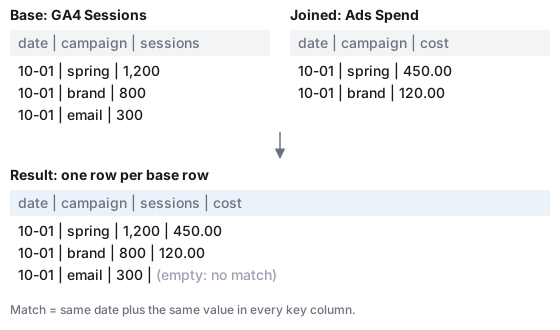
A join is a left join. Every row of the base table appears in the result once. For each joined table, Lens finds the row with the same date and the same key values and adds its columns. A base row with no match keeps its own values and gets empty values for the joined columns. Date is always part of the match; you only pick the other keys.
Union
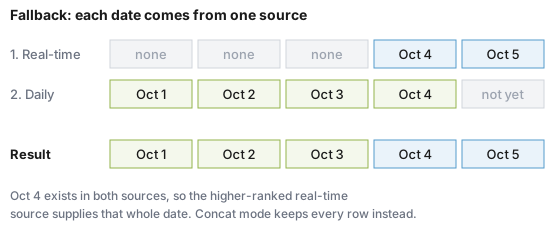
A union lists its sources in priority order. In Fallback mode (the default), each date goes to the highest-priority source that has any row for that date, and the other sources' rows for that date are dropped. In Concat mode every row from every source is kept.
Pivot
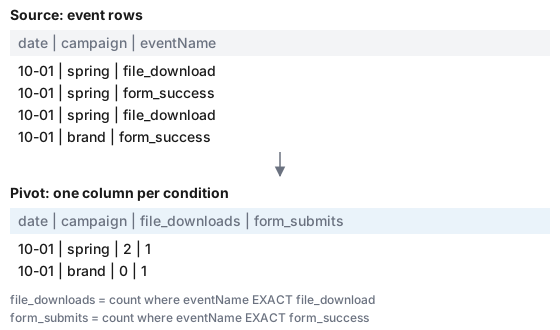
A pivot groups one source table by the dimensions you choose (plus date) and computes each metric with its own conditions, for example "count rows where event name equals file_download".
When derived tables refresh
Derived tables have no schedule panel. Lens saves them with a schedule of cascade:
- Saving the table queues a build right away.
- Every successful sync of a source table queues every Join, Union and Pivot built on it.
- You can also click Sync Now on the table at any time.
Each build replaces the whole derived table, so it always reflects the current source data. If a source table has never synced, the derived table waits for it rather than building on nothing.
A Join or Union compares dates across tables, so its sources should be stored in the same time zone. Lens refuses to save a Join or Union whose sources differ. See Dates and Time Zones.
Metrics on top of derived tables
Ratio and Expression metrics work on derived tables like any other table, which is how you get cost per session or ROAS from a join of analytics and ad cost. See Ratio and Expression Metrics.