What it shows
A content tile shows text you write, either plain text or simple HTML. It reads no table, so it never changes with the date range or filters. It appears on the board and on every public report that includes the board.
| Use it for | Not for |
|---|---|
| Section headings between groups of tiles | Numbers that should update. Use a KPI tile |
| How to read the board, definitions, data caveats | Private notes. Anyone who can open the report can read it |
| Links to related boards, reports or documents | Embedded videos, forms or scripts, which are removed |
Example
A board for a marketing team opens with a short note. In the tile editor:
| Setting | Value |
|---|---|
| Title | About this board |
| Type | Content |
| Content | See below |
| Body | Collapsible, opens collapsed |
| Size | Large |
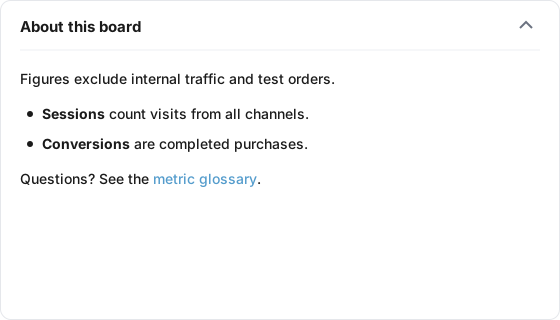
The Content box holds:
<p>Figures exclude internal traffic and test orders.</p>
<ul>
  <li><strong>Sessions</strong> count visits from all channels.</li>
  <li><strong>Conversions</strong> are completed purchases.</li>
</ul>
<p>Questions? See the <a href="https://example.com/metrics" target="_blank">metric glossary</a>.</p>
The board shows a full-width tile with only the header "About this board" and an arrow. Clicking the header or the arrow opens the body: one sentence, a two-item bulleted list with bold terms, and a link that opens in a new tab.
Data it needs
None. A content tile has no data table, metric or date range, so the editor hides its Data and Display tabs.
Settings
| Setting | What it does | Default |
|---|---|---|
| Title | The header. Optional on a content tile, up to 80 characters. Leave it blank for a note with no header bar | Empty |
| Description | Text behind an info icon in the header, up to 500 characters | Empty |
| Content | Plain text or HTML. Required | Empty |
| Show preview | A link under the box that shows the content as it will render, after unsafe parts are removed | Hidden |
| Body | Always shown, Collapsible, opens expanded, or Collapsible, opens collapsed | Always shown |
| Size | Small, Third, Medium or Large | Medium |
How it calculates
There is no calculation. When the tile is drawn, the content goes through a safety filter, the same on the board, the report and the editor preview:
| Content | What happens |
|---|---|
| Plain text with no tags | Shown as typed, with its line breaks kept |
| Allowed tags | Kept: headings, paragraphs, line breaks, rules, lists, tables, blockquotes, code and pre, bold, italic, underline, strike, mark, small, sub and sup, abbreviations, definition lists, figures, links, images, span and div |
| Other formatting tags | Removed, but their text is kept |
| Scripts, styles, iframes, forms, inputs, buttons, video, audio, svg | Removed with everything inside them |
| Attributes | Kept: href, src, alt, title, target, rel, width, height, colspan, rowspan, align, style, class. Everything else, including event handlers, is removed |
| Links and image sources | Kept for web addresses, mailto, tel, relative paths and inline images. javascript: links are removed |
Links with target="_blank" | Open in a new tab, made safe against the new page controlling yours |
| Inline styles | Kept, except url() values, imports and script-like values |
With Body set to collapsible, the tile always has a header. An untitled collapsible tile is headed "Note".
What viewers can do
| Action | Board | Public report |
|---|---|---|
| Read the content and follow links | Yes | Yes |
| Expand or collapse a collapsible body | Click the arrow or anywhere on the header | Same |
| Read the description | Info icon in the header | Same |
The expanded or collapsed state is not saved. Each page load starts from the Body setting.
Limits and gotchas
- Everyone with the report link can read it. Do not put credentials, internal-only notes or personal data in a content tile.
- Plain text and HTML do not mix well. As soon as the content holds a tag, line breaks are no longer kept; use
<p>or<br>for every line. - Removed parts are silent. A script, embed or form is simply dropped. Click Show preview to see what will actually render.
- Images must be hosted elsewhere. Use a full web address in
<img src>. There is no upload. - The text does not change with the board. Dates or numbers written in a note stay as typed when the date range or filters change.
- A collapsed tile keeps its width. Its place on the row is set by Size, collapsed or not.